Faster first drafts.
Get the message out of your head and into the compose box in one pass.
Say it. Send it clean. Zero Typing turns your voice into polished, punctuated text right inside Gmail, so you can dictate emails with AI and spend your energy on what the message says instead of how long it takes to type.
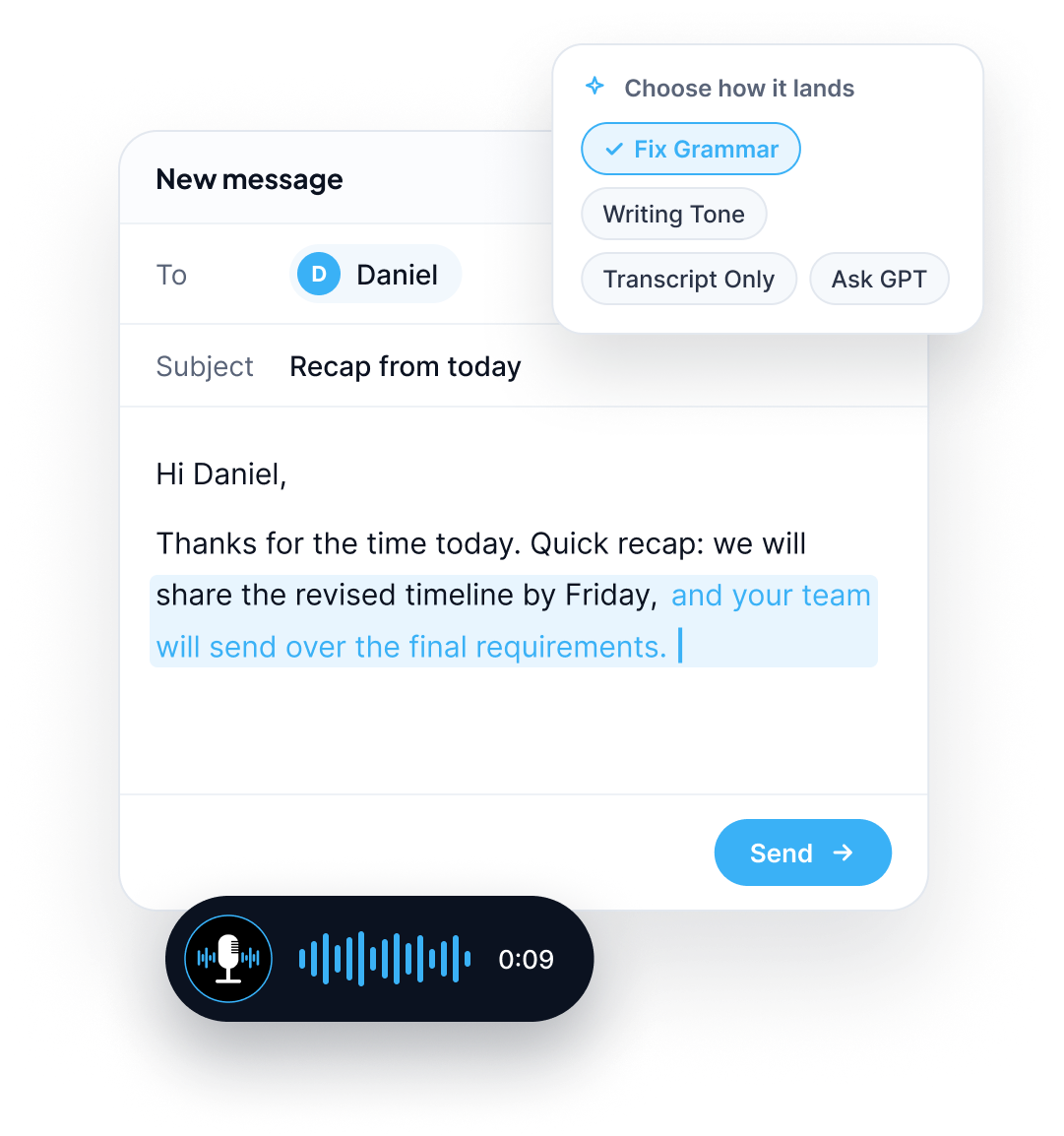
Email is one of the biggest sources of everyday typing. Replies, follow ups, updates, and quick confirmations add up, and most of it is written one key at a time. Zero Typing is an AI email dictation tool that lets you speak instead. Click into a message, talk naturally, and get clean text with punctuation and grammar already handled. It is voice to text for Gmail that is built to give you something you can send, not a rough transcript you have to repair.
Most people speak faster than they type, and Zero Typing is built to take full advantage of that, with up to 5x faster output than typing.
Speed is only half of it. Plain dictation tends to leave you with a raw transcript: missing punctuation, run on sentences, and wording that sounds fine out loud but awkward on screen. Zero Typing uses AI to clean up as you go, so the text that lands in your email is closer to finished.
5×
Typing
Zero Typing
Get the message out of your head and into the compose box in one pass.
Punctuation, paragraphs, and grammar are tidied for you.
You review and send instead of rewriting.
You do not need to learn a new email client. Zero Typing works with Gmail as it is.
Open Gmail and click into the body of a new message or reply.
Start Zero Typing on your Mac, Windows PC, or the web app.
Speak naturally. Say it the way you would say it to the person across the table.
Choose how it lands. Insert your exact words, or apply a prompt such as Fix Grammar or Writing Tone first.
Review and send.
On Android, a floating Zero Typing button appears over the text field, including the Gmail compose box. Setup takes a few minutes, and the Android install guide walks you through it.
Want to know what happens between your voice and the page? Read how AI voice typing works.
Turning speech into text is the easy part. The value is in what happens next. Zero Typing gives you control over how your words come out.
Talk the way you naturally talk. Fix Grammar smooths out the slips, repeated words, and loose sentences before the text reaches your email.
A note to a teammate and a note to a client should not sound the same. Writing Tone lets you say it casually and send it in the voice the situation calls for.
Sometimes you want no changes at all. Transcript Only keeps what you said, word for word.
Stuck on how to word a tricky reply? Ask GPT helps you work it out by voice without leaving the message you are writing.
Client names, company names, and product terms are where dictation slips most often. Add them to your Personal Dictionary once and they are applied correctly every time you speak, in any language.
Zero Typing uses AI powered automatic language detection, so it recognizes the language you are speaking and writes it out accordingly.
Answer a thread in the time it takes to say the answer.
Dictate the recap while the context is still fresh.
Talk through the structure first, then edit the text.
Let your Personal Dictionary do the work.
For a deeper walkthrough of speeding up an entire inbox, see our email dictation guide.
Zero Typing works across everyday apps rather than inside a single one, so the same voice typing follows you through your day. Draft the document in Google Docs, keep up with your team in Slack and Notion, and speak your questions into AI chat tools without switching tools or habits.

($8/month, 20% off annual billing)
($12 per seat /month)
See every plan on the pricing page.
Open Gmail, start Zero Typing, and say it once.
Yes. Click into a Gmail message, start Zero Typing, and speak. Your words appear as clean, punctuated text in the compose box. Zero Typing works across everyday apps including Gmail, Google Docs, Slack, and AI chat tools, so you do not need a separate tool for each one.
Standard dictation often returns a raw transcript that you still need to correct. Zero Typing adds punctuation, fixes grammar, and can adjust tone as part of the process, so there is less to fix before you send. For a closer look, read our comparison of voice typing vs built in dictation.
Yes. The Writing Tone prompt reshapes how your message sounds, Fix Grammar cleans up the language, and Transcript Only keeps your exact words. You choose the option that fits each email.
Yes, if you add them to your Personal Dictionary. Save names, industry terms, and brand words once, and Zero Typing spells them the way you intended each time you speak.
Zero Typing uses AI powered automatic language detection, so it identifies the language you are speaking and writes your words in that language.
There is a free plan that includes 15 minutes of audio transcription per week, a Personal Dictionary, and basic prompt selection. Pro is $8 per month, or 20% less with annual billing, and adds unlimited words and custom prompts. Details are on the pricing page.
Zero Typing is available for Mac and Windows through the download page, for Android on Google Play, and as a web app.
No. It works across everyday apps, including Google Docs, Slack and Notion, and AI chat tools. Need setup help? Visit the Help Center.
Dictate your first email with AI today.
Sign up for our newsletter and join the Zero Typing AI community.