It varies a lot. The study's dataset showed large differences between typists, with faster typists also making fewer errors.
Typing Speed vs
Speaking Speed: How
Much Time Could You
Save?
Typing speed vs speaking speed is a lopsided race. The average person types about 52 words per minute (WPM) and speaks at roughly 150 WPM, which means talking is close to three times faster than typing. For anyone who writes emails, documents, messages, or AI prompts all day, that gap adds up to hours every week.
This guide breaks down the real numbers, shows exactly how much time you could save at different writing volumes, and explains where the gap is even bigger than raw WPM suggests. Every speed figure below is tied to a published source.
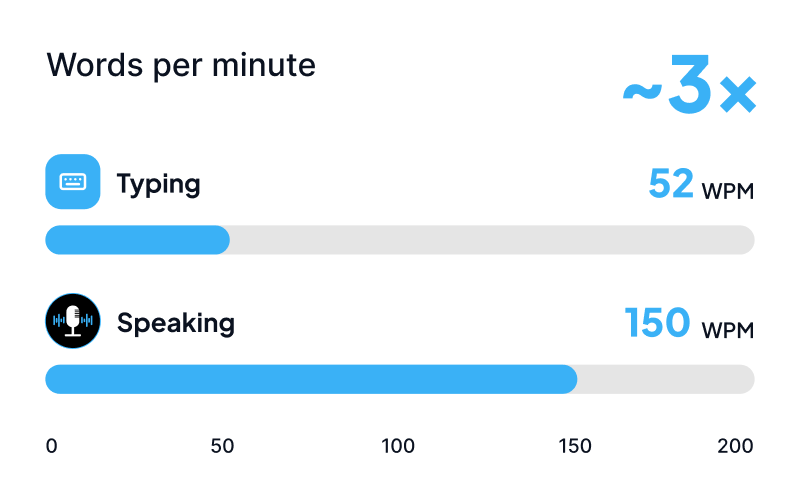
Quick answer: Yes, talking is faster than typing. Typists average about 52 WPM, conversational speech runs about 120 to 150 WPM, and a Stanford study found speech input was 3.0x faster than typing on a phone keyboard in English.
On This Page
What Is the Average Typing Speed?
The average typing speed is about 52 words per minute. That figure comes from the largest typing study on record: researchers at Aalto University and the University of Cambridge analyzed 136 million keystrokes from 168,000 volunteers, and the average participant typed 52 WPM. Performance varied widely, and the same release notes that professionally trained typists in the 1970s and 80s typically reached 60 to 90 WPM.
A few things to keep in mind about typing speed:
It's a best-case number. Typing tests measure copying sentences you can see. Real writing means pausing to think, backspacing, and rewording, so your effective speed while composing is usually lower.
Phones are slower still. Thumb typing on a touchscreen is a different, generally slower skill than typing on a full keyboard, which is why voice input shows its biggest advantage on mobile.
What Is the Average Speaking Speed in Words Per Minute?
Average speaking words per minute land between 120 and 150 for everyday conversation. Commonly cited ranges put casual talk at roughly 100 to 150 WPM, with audiobook narrators and radio hosts at about 150 to 160 WPM and auctioneers far higher.
Academic measurements often come out faster. In an analysis of large conversational speech corpora, University of Pennsylvania researchers found an overall average of 196 WPM when dividing total words by total conversation time, and 164 WPM when measuring each speaker's own turns. They also noted there is no single standard way to measure speaking rate, which is why published figures differ.
For the comparisons in this article, we use 150 WPM as a conservative middle value. It is at the lower end of what research measures and in line with the most common estimates.
Average typing
~52 WPM
Casual talk
120-150 WPM
Everyday conversation
120-150 WPM
Narrators and radio hosts
150-160 WPM
UPenn, each speaker's turn
160 WPM
UPenn, total conversation time
196 WPM
050100150200
Words per minute. Dashed line marks the 150 WPM used in this article.
Is Talking Faster Than Typing?
Yes. Talking is faster than typing, by roughly 3x in controlled testing.
In 2016, researchers from Stanford, the University of Washington, and Baidu tested speech recognition against typing on a smartphone. According to the published paper, English speech input was 3.0x faster than a state-of-the-art phone keyboard, and the English error rate was 20.4% lower with speech. Mandarin showed a 2.8x speed advantage and a 63.4% lower error rate. Stanford's summary of the study describes the result as a surprise even to the researchers.
English
3.0x
faster
20.4%
lower error rate
Mandarin
2.8x
faster
63.4%
lower error rate
The simple math lines up with that result. Divide 150 spoken WPM by 52 typed WPM and you get about 2.9x.
150 ÷ 52 = 2.9xA fair caveat: this was a 32-person study using phrases on an iPhone keyboard and the speech engine available in 2016. Speech recognition has improved considerably since, but the exact multiplier will vary with your typing skill, speaking pace, and tool. The direction of the result, though, is consistent across both the lab data and the raw WPM math: speaking wins on speed.
Typing Speed vs Speaking Speed at a Glance
Average speed
Typing
~52 WPM
Speaking
~120-150 WPM (conversation)
Fast end of the range
Typing
60-90 WPM (trained typists)
Speaking
160+ WPM (narrators, broadcasters)
Physical effort
Typing
Repetitive finger and wrist movement
Speaking
Voice only
Where it's weakest
Typing
Phones, long drafts, fatigue
Speaking
Quiet shared spaces, symbol-heavy work
Measured speed advantage
Typing
Baseline
Speaking
~3x on mobile in Stanford test
Sources: Aalto/Cambridge typing study, Stanford speech study, published speaking-rate ranges.
How Much Time Could You Save by Speaking Instead of Typing?
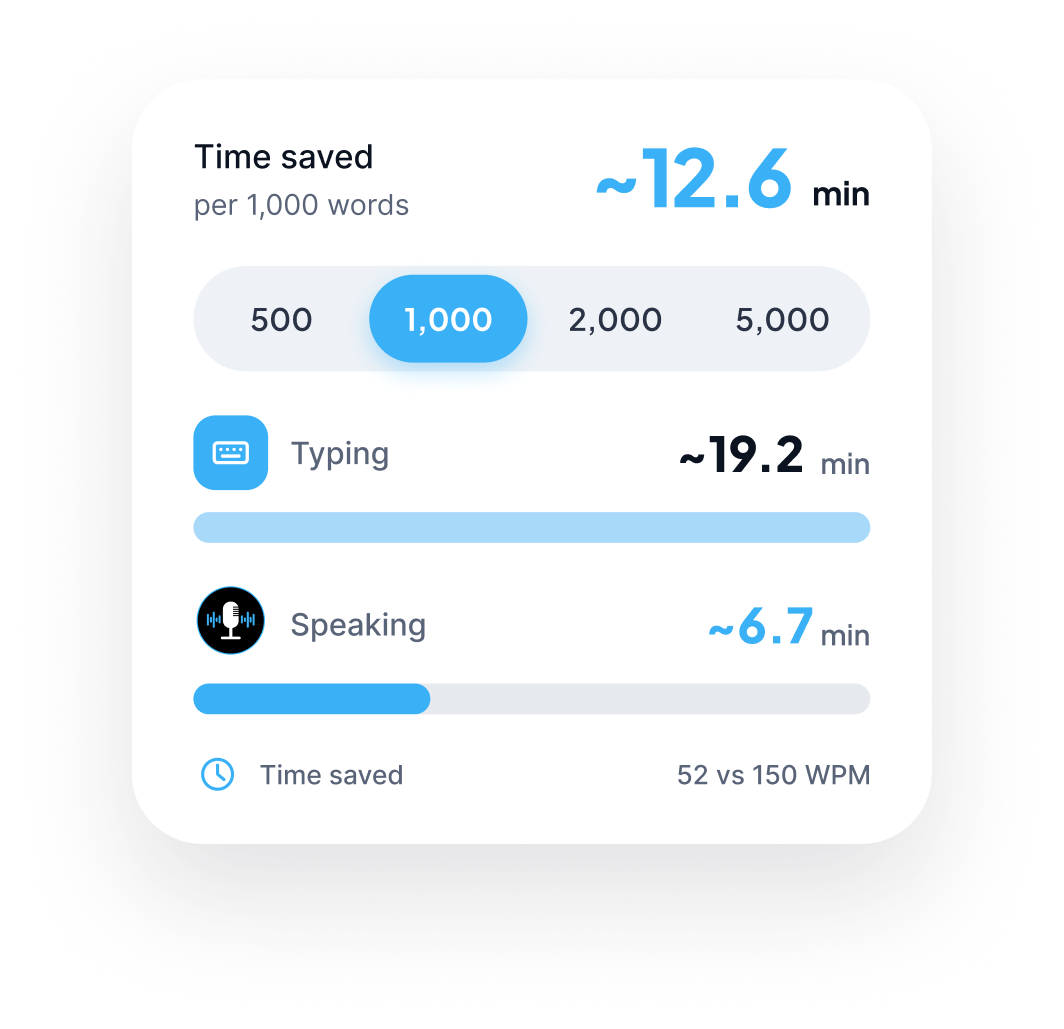
You could save roughly 12 minutes for every 1,000 words you write. This table uses 52 WPM for typing and 150 WPM for speaking, and measures raw time to get words onto the screen.
500 words (a long email)
Typing (52 WPM): ~9.6 min
Speaking (150 WPM): ~3.3 min
Time saved: ~6.3 min
1,000 words (a short report)
Typing (52 WPM): ~19.2 min
Speaking (150 WPM): ~6.7 min
Time saved: ~12.6 min
2,000 words (a typical workday of writing)
Typing (52 WPM): ~38.5 min
Speaking (150 WPM): ~13.3 min
Time saved: ~25.1 min
5,000 words (a heavy writing day)
Typing (52 WPM): ~96.2 min
Speaking (150 WPM): ~33.3 min
Time saved: ~62.8 min
Scale that up. If you write about 2,000 words a day, five days a week, for 48 weeks, switching to speech saves around 100 hours a year. That is more than two full work weeks you could spend on work that isn't transcribing your own thoughts.
Treat these as estimates, not guarantees. The math assumes you speak at a steady 150 WPM, which is realistic for dictating familiar material but may be slower when you're composing something complex on the fly. It also counts only the time to produce the words, which brings us to the bigger story.
Why the Real Gap Is Bigger Than Raw WPM
Raw WPM only measures one step: getting words onto the screen. Real writing has more steps, and typing is slow at nearly all of them.
When you type, you stop to fix typos, backspace to reword, adjust punctuation, correct names, and clean up grammar. Those pauses never show up in a typing test, but they eat a large share of your writing time. Speaking removes much of the friction between having a thought and seeing it in text, because you say the whole sentence first and fix it once.
Typing
ThoughtFix typoRewordAdjust punctuationCorrect namesClean up grammarText
Speaking
ThoughtSay the whole sentenceFix it onceText
This is the difference between raw speed and end-to-end efficiency, and it is the idea behind Zero Typing's "Stop Typing. Start Talking." approach. Zero Typing's homepage cites 5x faster efficiency, which is a broader measure than the roughly 3x raw-speed gain in the research above. Features that target the cleanup stage include:
Fix Grammar and Writing Tone prompts that polish text as you dictate.
Personal Dictionary for custom words, names, and spellings, so you don't correct the same term twice.
Automatic language detection, so switching languages doesn't mean switching settings.
Transcript Only mode when you want your words captured exactly as spoken.
Want the technical side? Our explainer on how AI voice typing works walks through what happens between your voice and the finished text.
When Typing Still Wins
Speaking isn't always the right tool, and pretending otherwise isn't helpful. Typing is still the better choice when:
You're in a quiet or shared space.
Meetings, libraries, and open offices are not ideal places to dictate.
You're making tiny edits.
Fixing a single word is faster with a keystroke than a sentence.
The text is symbol-heavy.
Spreadsheet formulas and certain code syntax can be quicker to type.
Privacy matters in the moment.
Some content you simply don't want to say aloud.
The strongest approach for most people is a mix: speak the first draft, then use the keyboard for small precision edits. That keeps the speed advantage where it's largest, in drafting.
How to Start Talking Instead of Typing
You don't need to relearn how to write. Start small and build the habit.
- 1
Pick one recurring task. Replies, meeting follow-ups, first drafts, or notes are all good starting points. If email is your biggest time sink, our guide to a faster email workflow covers that use case in depth.
- 2
Speak in full thoughts. Say the whole sentence, then move on. Resist the urge to stop and edit mid-sentence.
- 3
Use it where you already write. Zero Typing works across apps, including Google Docs, Gmail, Slack, and AI chat tools, so there's no new editor to learn. If Google Docs is your main workspace, see voice typing for Slack and Notion.
- 4
Compare it with your built-in options. Not sure how a dedicated tool differs from the dictation already on your device? Read voice typing vs built-in dictation.
- 5
Try it yourself. Watch it work in the Zero Typing demo, then check Zero Typing pricing: the Free plan includes 15 minutes of audio transcription per week, and ZT Pro is $8 per month for unlimited words and audio transcription.
Zero Typing is available on Mac, Windows, and Android, plus a web app.
MacWindowsAndroidWeb app
Frequently Asked Questions
A good typing speed is anything above the average of about 52 WPM. Trained typists historically reached 60 to 90 WPM, and the fastest typists in modern studies go well beyond that. But even a very fast typist is typically working below the pace of normal speech.
Most sources put average conversational speaking speed between 120 and 150 WPM. Some research on large conversation datasets measures higher, up to about 196 WPM depending on how pauses are counted. Presentations are usually slower and broadcasting slightly faster.
Yes. Typing averages about 52 WPM while conversational speech averages about 120 to 150 WPM. A Stanford study measured English speech input at 3.0x the speed of typing on a smartphone keyboard.
In controlled testing, voice input was about 3x faster than typing on a phone. Your own results depend on your typing skill, how fast you speak, and the dictation tool. Zero Typing's homepage cites 5x faster efficiency when you include cleanup features that reduce editing time.
Not necessarily. In the Stanford study, the English error rate with speech was 20.4% lower than with the phone keyboard. Accuracy still depends on your microphone, environment, and tool, which is why features like a personal dictionary for names and specialized terms are worth having.
Zero Typing has a Free plan (ZT Basic) that includes 15 minutes of audio transcription per week, a Personal Dictionary, and basic prompt selection. ZT Pro is $8 per month and adds unlimited words and audio transcription per week and custom prompt creation. See current pricing for details.

The Bottom Line
On raw numbers, the typing speed vs speaking speed comparison isn't close: about 52 WPM typing against roughly 150 WPM speaking, a gap of nearly 3x that holds up in both the math and controlled research. The bigger win comes from skipping the corrections and clean up that typing forces on you.
If you spend hours a week turning thoughts into text, the fastest improvement is to stop typing the first draft. Try Zero Typing and see how much of your day comes back.
Sign up for our newsletter and join the Zero Typing AI community.

This site is protected by reCAPTCHA and the Google Privacy Policy and Terms of Service apply.