You think faster than you type. Speaking keeps up with your train of thought, so you stop losing ideas while you hunt for the right key.
Voice Typing for Students:
Brainstorm, Outline, and
Write Essays by Voice
Voice typing for students means speaking your ideas instead of typing them, and having the words appear as clean, punctuated text in Google Docs, Word, or any app you write in. Zero Typing AI lets you brainstorm, outline, and dictate essays out loud, so you can get a first draft down while your ideas are still fresh.
Most students do not struggle with ideas. They struggle with the gap between what they are thinking and what they can type before the thought fades. Zero Typing AI closes that gap. Hit record, talk through your argument the way you would explain it to a friend, and get text you can edit instead of a blank page you have to fill.
Try it free: no credit card required. The free plan includes 15 minutes of transcription every week.
On This Page
Why Voice Typing Works So Well for Students
Writing an essay is two jobs at once: figuring out what you think, and typing it out in good sentences. Doing both at the same time is what makes drafting feel slow. Speaking splits them apart. You get your thinking out first, then shape it.
Here is why dictation fits student life:
It beats the blank page. Talking is easier to start than typing. A messy spoken draft is far more useful than an empty document.
It works away from your desk. Walk around, pace the library, or talk through notes after a lecture while the material is still clear.
It is easier on your hands. Long writing days put real strain on wrists and fingers. Dictation gives them a break.
It helps if English is not your first language. Many students find it more natural to say a thought than to type it in a second language.
How Do You Brainstorm Essays by Voice?
To brainstorm an essay by voice, open any note or document, start Zero Typing AI, and talk through your topic for a few minutes without stopping to edit. Say what the assignment is asking, what you already know, what you are unsure about, and what you want to argue. Then clean up the transcript into a rough list of ideas.
Spoken brainstorming works because it removes the pressure to write well. You can wander, change direction, and contradict yourself. That is exactly what brainstorming is for.
A simple way to run a brainstorm session:
- 1
Read the prompt out loud, then say it again in your own words.
- 2
Say everything you already know about the topic, in any order.
- 3
List your questions. What do you still need to find out?
- 4
Say your gut-feeling argument, even if you are not sure it is right.
- 5
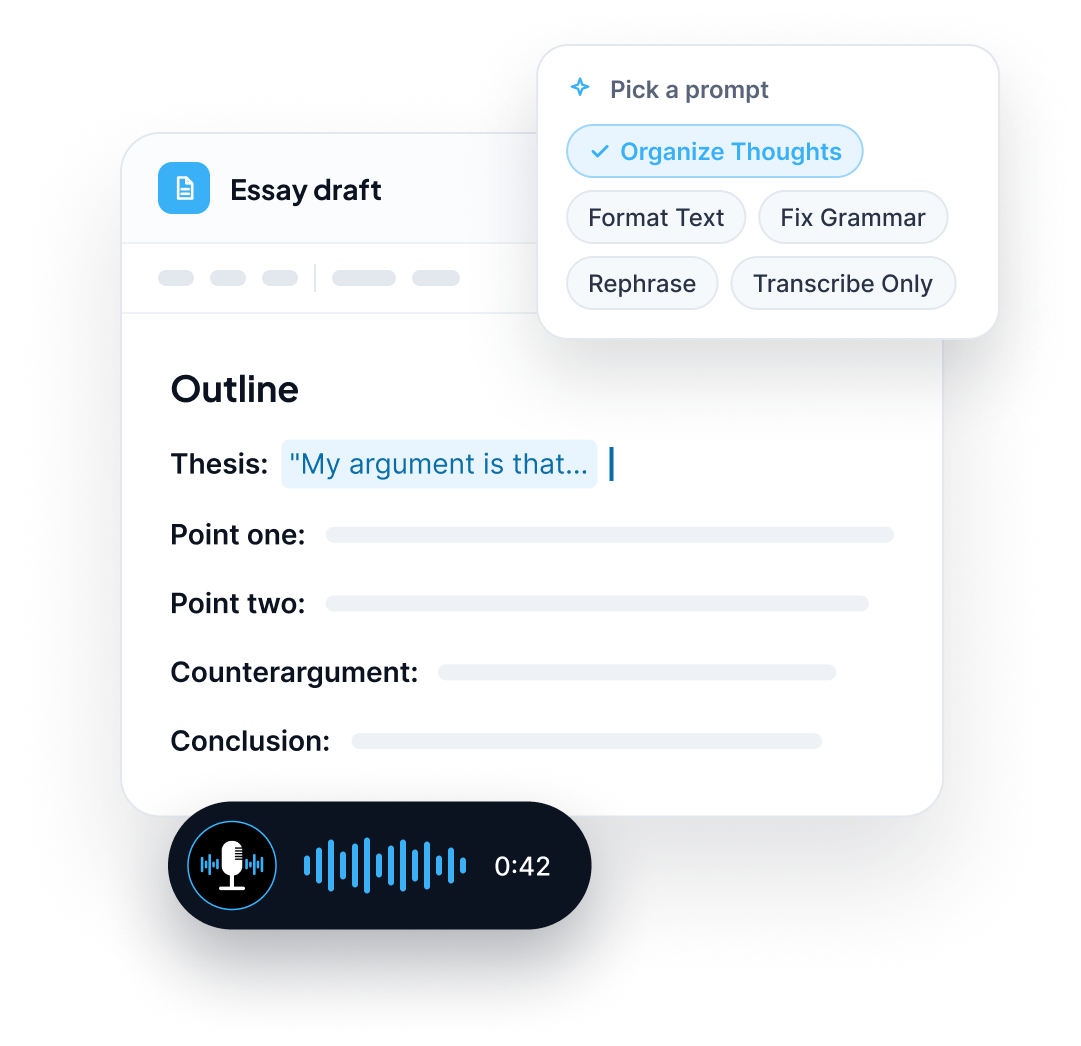
Pick the transcript prompt that suits the job. Use Organize Thoughts to turn a rambling recording into a structured list, or Transcribe Only if you want your exact words.
Fix GrammarFormat TextRephraseOrganize ThoughtsTranscribe Only
Zero Typing AI includes built-in prompts like Fix Grammar, Format Text, Rephrase, Organize Thoughts, and Transcribe Only, so the same recording can become raw notes or a tidy outline in a click. You can try the prompt options yourself on the Zero Typing AI demo page.
How Do You Outline an Essay by Speaking?
To outline an essay by voice, dictate your thesis first, then speak each main point and the evidence you plan to use for it, in the order you want to present them. Apply a formatting prompt afterward so the dictation turns into headings and bullet points you can drag around.
Try this spoken structure:
Thesis:"My argument is that..."
Point one:the claim, then the evidence or quote that supports it
Point two:the claim, then the evidence
Counterargument:what someone would disagree with, and how you answer it
Conclusion:what the reader should take away
Because Zero Typing AI works in any app with a text field, you can dictate your outline into Google Docs, Notion, Word, or your notes app. If your class notes already live in Notion, our guide to voice typing for Slack and Notion shows how the same setup works there.
How Do You Dictate an Essay Draft?
To dictate an essay, work through your outline one section at a time. Speak each paragraph as if you were explaining it to a classmate, then move to the next. Zero Typing AI adds punctuation, capitalization, and paragraph breaks for you, so you do not need to say "period" or "new paragraph" and break your flow.
Tips that make dictated drafts better:
Dictate one paragraph at a time. Short bursts are easier to organize than one long monologue.
Do not edit while you talk. Get the whole section out first. Fix it on a second pass.
Speak in full sentences. It makes the transcript read like writing, not notes.
Read it back. Skim the draft out loud once. Your ear catches clunky sentences your eyes miss.
Add tricky names and terms to your Personal Dictionary. Author names, course vocabulary, and scientific terms will then come out spelled correctly every time.
Want a deeper look at how the technology turns speech into polished text? Read how AI voice typing actually works.
Can You Dictate Straight Into Google Docs?
Yes. Zero Typing AI runs on your device and types into whichever app your cursor is in, including Google Docs. Click into your document, start dictating, and the text appears where you are working, so you do not have to copy and paste from another tool.
That makes a smooth student workflow:
01
Brainstorm out loud in a notes app.
02
Dictate your outline into a fresh Google Doc.
03
Draft each section by voice under its heading.
04
Switch to the keyboard to revise, cite, and format.
For a full walkthrough of dictating inside Docs, see our page on voice typing for Google Docs. If you are wondering how this compares with the dictation tools already built into your laptop, our comparison of voice typing vs built-in dictation covers it in detail.
What Can Students Use Zero Typing AI For?
Essays are the headline use, but voice typing helps across a student's week:
Essay brainstorming
Talk through the prompt and your ideas, then turn the transcript into a list
Outlines
Speak your thesis and main points, then format into headings
First drafts
Dictate section by section and edit afterward
Homework and short answers
Speak your answer instead of typing long responses
Lecture and study notes
Summarize what you just learned out loud while it is fresh
Research notes
Dictate quotes, sources, and your reactions as you read
Group project messages
Reply to teammates quickly without stopping to type
Emails to professors
Draft polite, clear emails by voice. See the fastest way to write emails without typing
Prompting AI study tools
Speak long, detailed prompts instead of typing them. See voice typing for AI chat prompts
If you use AI chat tools for studying, spoken prompts tend to be longer and more specific, which usually gets better answers. Our guide to dictating better AI prompts has examples you can reuse.
Features That Matter for Student Writing
Automatic punctuation and formatting.
No spoken commands, so your thinking stays uninterrupted.
Personal Dictionary.
Add names, course terms, and special spellings once, and they transcribe correctly from then on.
AI-powered language detection.
Dictate in the language you are thinking in without switching settings manually.
Prompt-based rewriting.
Use Fix Grammar, Rephrase, Format Text, Organize Thoughts, or Transcribe Only to shape a spoken draft.
Works in the apps you already use.
Google Docs, Gmail, Slack, Notion, and AI chat tools, with no separate plugin for each.
Multiple platforms.
Available for Mac, Windows, Android, and the web, with download options on the download page.
Privacy.
Voice data is encrypted during processing and is never stored, sold, or shared. See the Privacy Policy for details.
How to Start Voice Typing for Your Next Essay
Download Zero Typing AI from the download page and sign in.
Open your document, such as a Google Doc, and click where you want the text to go.
Start dictating. Speak your brainstorm, outline, or paragraph naturally.
Pick a prompt like Organize Thoughts or Format Text if you want the transcript reshaped.
Edit and cite. Revise by voice or keyboard, then add your sources the way your instructor requires.
Need help getting set up? The Help Center has answers.
Pricing for Students
Zero Typing AI is free to start.
ZT Basic (Free)
What you get
15 minutes of audio transcription per week, Personal Dictionary, basic prompt selection, translate and transcribe audio
ZT Pro
($8/month, 20% off annual billing)
What you get
Unlimited words per week, unlimited audio transcription, custom prompt creation, early access to new features
Fifteen free minutes a week is enough to test dictation on a brainstorm or a short assignment. If you are drafting every week, ZT Pro removes the limit. Compare everything on the pricing page.
A Note on Academic Integrity
Voice typing changes how you get words onto the page, not whose ideas they are. Dictating your own thoughts is simply a faster way of typing them. If you use AI rewriting features or AI chat tools, check your school or instructor's policy on AI assistance, and always cite your sources.
Frequently Asked Questions
Yes. Voice typing is a fast way to get a first draft down because speaking keeps pace with your thinking. Most students dictate a rough draft first, then switch to the keyboard to revise, tighten the argument, and add citations.
Start recording and talk through the assignment prompt, what you already know, your open questions, and your rough argument. Do not stop to edit. Then use a prompt like Organize Thoughts to turn the transcript into a structured list of ideas.
Yes. Zero Typing AI types into any app with a text field, including Google Docs. Click into your document and start speaking, and your words appear at your cursor.
Yes. ZT Basic is free and includes 15 minutes of audio transcription per week, which is enough to dictate short homework answers or test a longer assignment. ZT Pro at $8 per month removes the weekly limit.
No. Zero Typing AI adds punctuation, capitalization, and paragraph breaks automatically, so you can speak naturally.
Yes. Add author names, technical vocabulary, and special spellings to your Personal Dictionary, and they will be transcribed exactly as you entered them.
Yes. You can dictate in many languages, and automatic language detection handles the switch. Translation currently works into English only.
Zero Typing AI states that voice data is encrypted during processing and is never stored, sold, or shared. You can read the full Privacy Policy.
Dictating your own ideas is just typing by voice, so it is generally fine. Rules about AI assistance vary by school and instructor, so check your course policy before using AI rewriting or AI chat tools for graded work.

Stop Typing. Start Talking.
Your best ideas usually show up when you are explaining them, not when you are staring at a cursor. Zero Typing AI turns that explanation into a draft you can work with.
Sign up for our newsletter and join the Zero Typing AI community.

This site is protected by reCAPTCHA and the Google Privacy Policy and Terms of Service apply.